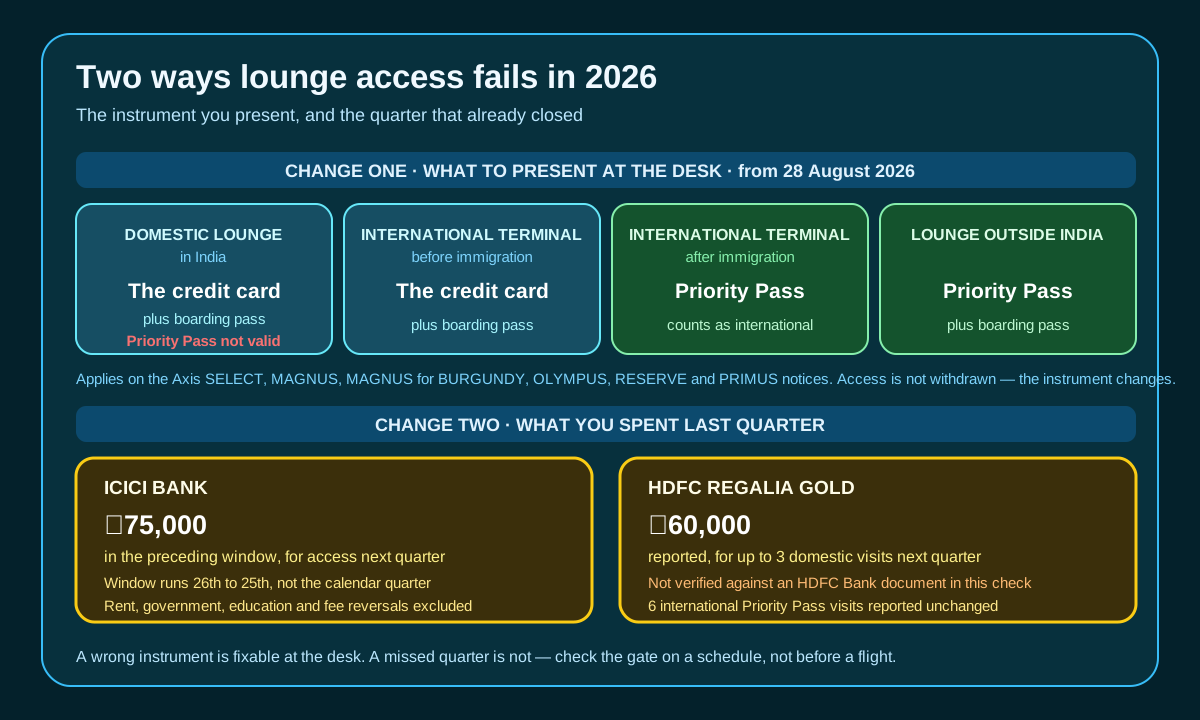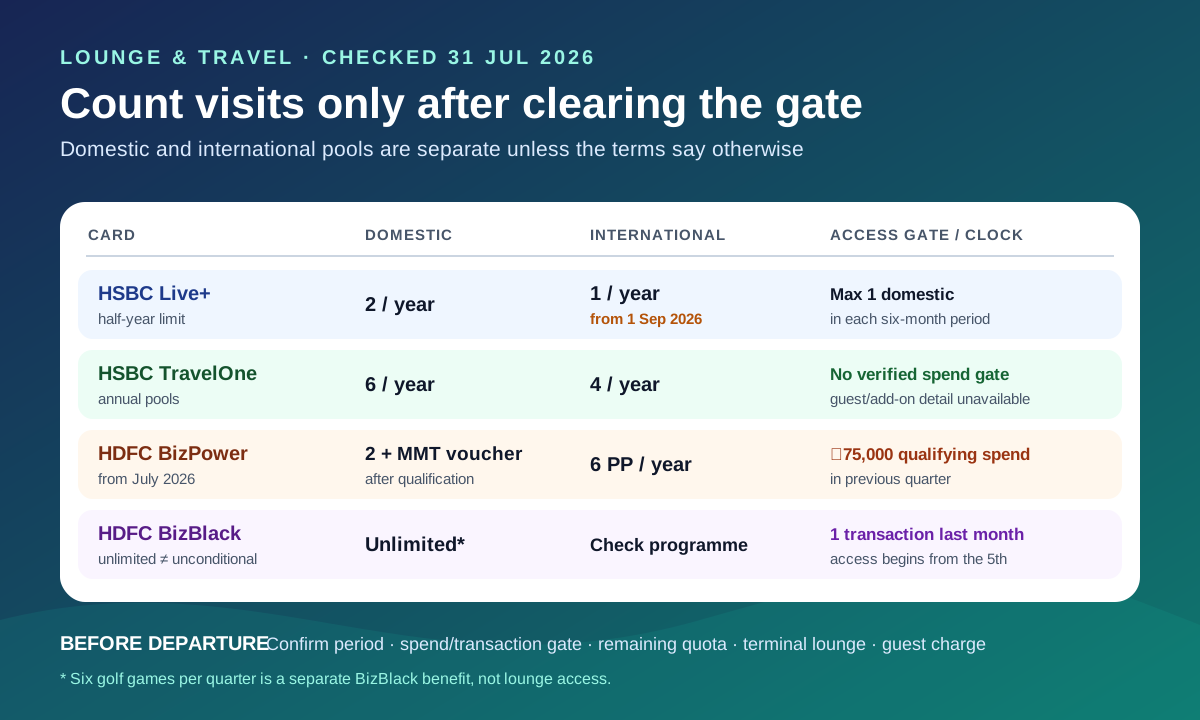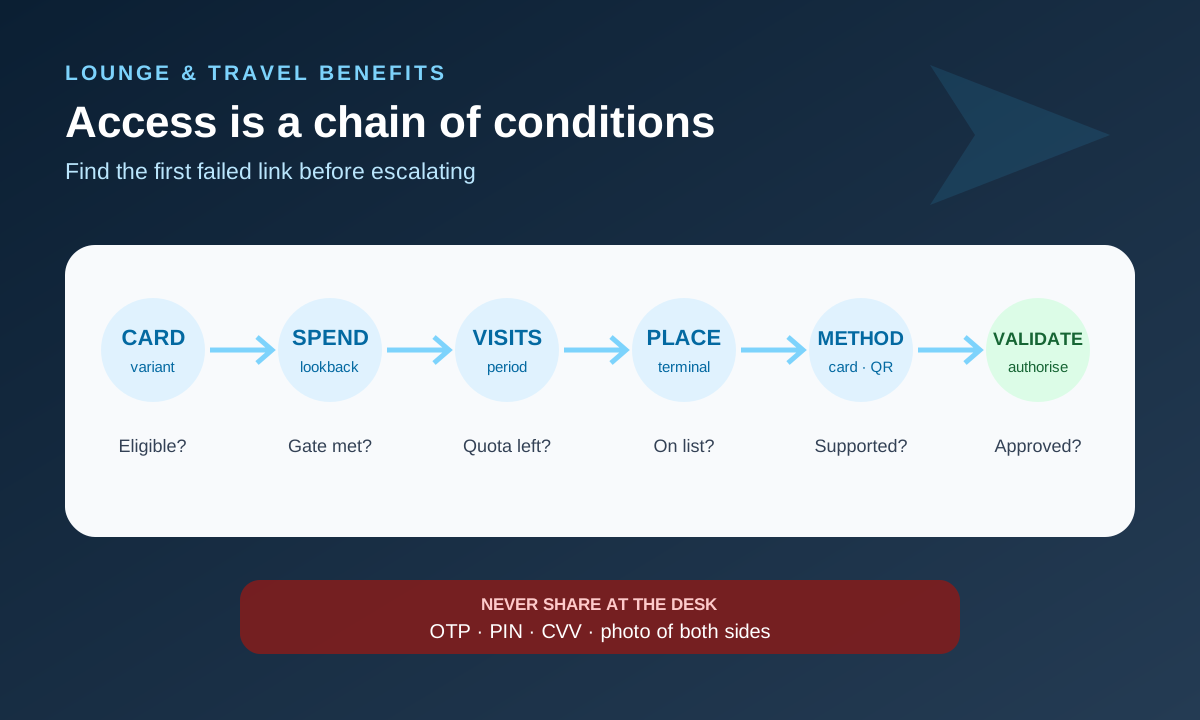
A lounge rejection at an airport does not automatically mean the card is broken or the lounge is acting incorrectly. Access usually depends on several conditions evaluated together: the exact card variant, current programme period, prior spending, remaining visit quota, participating lounge and terminal, card network, validation method and sometimes a small authorisation charge.
Because those conditions change, a screenshot saying “complimentary lounge access” is not enough. Before travelling, verify the live issuer terms and the network’s current participating-lounge list.
The access chain
Treat eligibility as a sequence. If any link fails, the desk may charge the walk-in price or decline the card.
| Check | Evidence to use | Common failure |
|---|---|---|
| Exact card variant | Card/account name in issuer app | Similar premium/basic variants confused |
| Programme dates | Current issuer lounge terms | Old benefit page or previous quarter used |
| Spend gate | Eligible spend in stated lookback period | Threshold missed after refunds/exclusions |
| Visit quota | Issuer/network usage record | Quarterly or annual quota already consumed |
| Lounge and terminal | Current network/issuer list | Right airport, wrong terminal or lounge |
| Access method | Physical card, app/QR or membership credential | Unsupported credential presented |
| Validation | Sufficient available limit and enabled transaction type | Small authorisation declined |
| Guest rule | Current guest pricing | Companion assumed complimentary |
Visa publishes an India participating airport lounge list, but a lounge appearing on a network list does not make every Visa card eligible. The issuer determines which card products and conditions receive the network benefit. Conversely, an issuer benefit can use a different access programme. Check both layers.
Before leaving for the airport
Save an offline copy or screenshot of the current terms because mobile data may be unreliable. Confirm:
- airport, domestic/international side and terminal;
- lounge name and operating hours;
- eligible card variant and network;
- access credential required;
- spend threshold period and your eligible total;
- visits remaining and whether quotas are per card, account or member;
- guest and child rules;
- validation charge and refund/reversal treatment.
Do not depend on an old blog, a search-result snippet or a benefit printed on obsolete packaging. A lounge can also be temporarily full even when the commercial access programme remains active.
Audit a spend gate separately
A rule such as “spend ₹50,000 in the previous calendar quarter” needs the same care as an annual fee waiver. Identify the lookback dates and count only eligible posted purchases after refunds. Payments to the card account are not purchase spend.
Our annual fee waiver audit shows how to build a transaction reconciliation. For lounge access, also confirm when eligibility is refreshed: immediately, monthly, quarterly or after a processing delay.
If you crossed the threshold yesterday, it may not have reached the lounge-access system today. Ask the issuer for the stated refresh period rather than assuming real-time eligibility.
At the lounge desk
Ask the attendant for the precise failure shown by the terminal, but do not demand that they override the issuer’s eligibility system. Useful failure labels include:
- card not supported;
- benefit unavailable;
- visit quota exhausted;
- transaction declined;
- credential invalid;
- terminal/loungelist mismatch;
- system offline;
- lounge at capacity.
If a paid entry is offered, ask the price before consenting. Do not repeatedly tap or swipe without knowing whether each attempt creates a validation entry. Preserve a receipt or decline slip that does not expose a complete card number.
Never let a stranger photograph both sides of your card, reveal a CVV, dictate an OTP or take the card out of sight. A normal lounge validation should not require your PIN, OTP or online-banking password.
Understand the validation charge
Some programmes validate access using a small charge or authorisation. Whether it is immediately reversed, later refunded or treated as a nominal fee depends on the programme. A failed authorisation can result from disabled international/contactless transactions, low available limit, card status or issuer controls even when the benefit is otherwise eligible.
Check the issuer app for pending and posted entries. A pending authorisation is not yet a final charge; our pending transaction explainer describes the distinction.
Do not dispute a valid, disclosed nominal access fee as fraud merely because it is small. First compare it with the programme terms.
After a denial
Write down the facts while they are fresh:
| Record | Example |
|---|---|
| Date/time and airport | 31 July, 07:20, Terminal 2 |
| Lounge | Exact displayed name |
| Card | Product and network; no full number |
| Credential | Physical card or app/QR |
| Desk result | “Benefit unavailable” |
| Spend gate | Period, eligible total and refresh date |
| Quota | Visits used before this attempt |
| Entries | Pending/posted validation amount |
| Cost paid | Receipt and guest count |
Contact the issuer or programme administrator through an official channel. Ask which condition failed and request the eligibility record for that date. Attach the receipt and a redacted image of the decline slip if needed.
The desk, network, issuer and third-party administrator have different roles. Send the complaint first to the party whose system determined eligibility, usually identified in the issuer benefit terms. Avoid posting staff names or complete receipts publicly.
When reimbursement is reasonable to request
A reimbursement request is strongest when you can show:
- your exact card and account were eligible under terms effective that day;
- the required spend and quota conditions were met;
- the lounge and terminal appeared on the applicable list;
- you used the required access method;
- the denial resulted from an acknowledged system or eligibility error;
- you incurred a documented replacement cost.
Eligibility does not automatically guarantee reimbursement, and terms may exclude outages, capacity limits or third-party failures. State the cost and requested resolution without claiming a right not found in the agreement.
Frequently asked questions
If a lounge is on the Visa list, can any Visa card enter?
No. The network list identifies participating lounges; the issuer’s product terms determine whether your card receives access and under what conditions.
Does meeting the spend gate create unlimited visits?
No. Spend eligibility and visit quota are separate conditions.
Can I use a digital card if the physical card is unavailable?
Only if the programme supports that credential. Some require the physical card; others use an app, QR code or membership account.
Is my guest free?
Do not assume so. Guest access may be paid even when the cardholder visit is complimentary.
Why was I denied after a card replacement?
A replacement number may not yet be linked to the lounge programme, or the required credential may need updating. Ask the issuer to confirm enrolment.
Should I rely on access for an important meal or meeting?
No. Capacity, operating hours and system availability can change. Treat lounge access as a conditional benefit and keep a fallback.
The practical answer
Verify card, period, spend gate, quota, lounge, terminal, credential and validation before travel. At the desk, capture the failure label and any cost without exposing card security data. Afterwards, ask the responsible party which condition failed.
“Lounge access included” is a summary. The enforceable, useful information is in the current conditions and participating-location list.
Network and programme materials checked on 31 July 2026. Source material was paraphrased; lounges, access methods and issuer eligibility can change without matching older summaries.