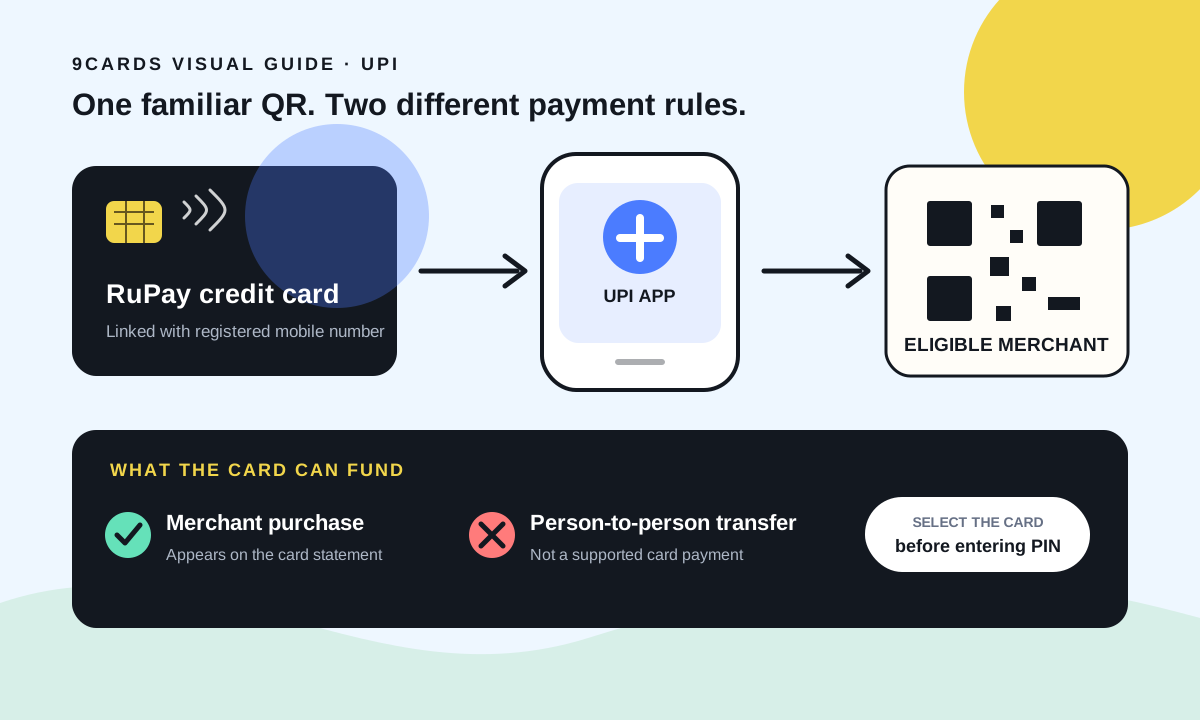
A RuPay credit card on UPI lets you scan an eligible merchant QR code and put the purchase on your card instead of taking money immediately from your bank account. It does not turn the card into a general UPI balance: person-to-person transfers, cash withdrawals and several restricted transaction types are not supported.
That distinction answers most questions about why a RuPay credit card works at one QR code and fails at another. The sticker may look the same, but the receiving UPI ID can be classified as a merchant, an individual or a restricted category. The funding source you select matters too.
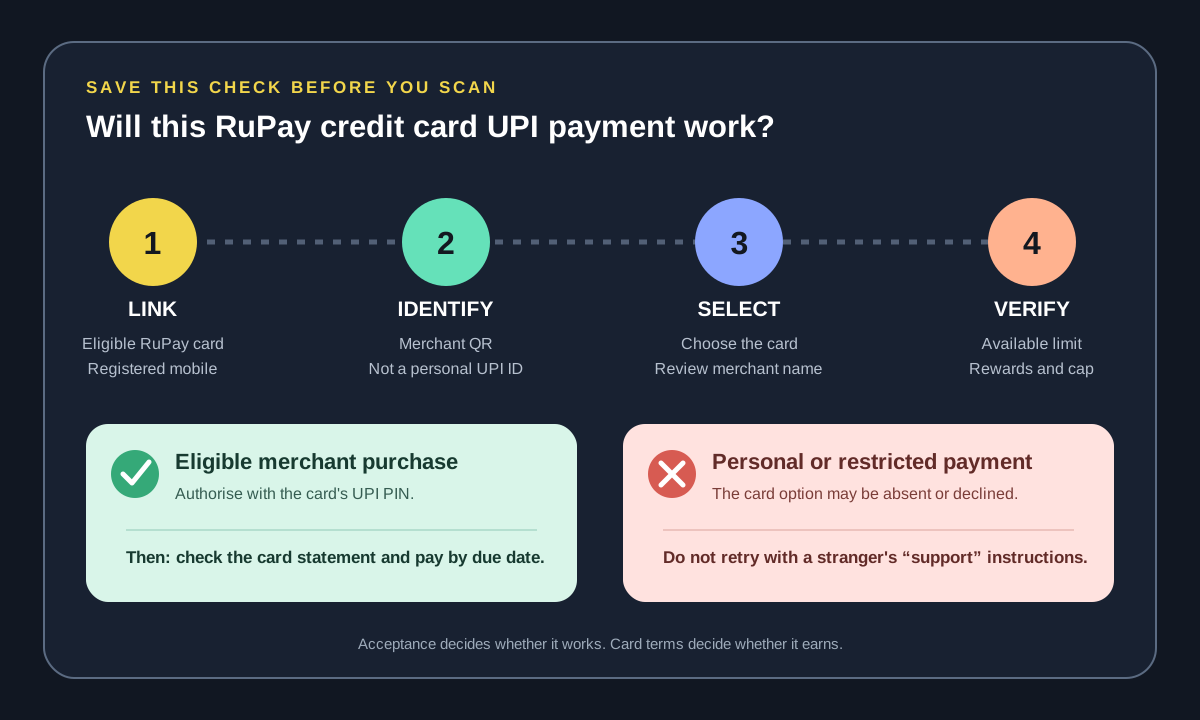
How a RuPay credit card payment travels through UPI
First, you link an eligible RuPay credit card in a supported UPI app using the mobile number registered with the issuer. The app discovers or verifies the card, you set a separate UPI PIN for it, and the card then appears as a payment source alongside your bank accounts.
At checkout, the flow is usually:
- Scan a merchant QR code or choose UPI at an online merchant.
- Select the linked RuPay credit card rather than a bank account.
- Review the merchant name and amount.
- Authorise with the credit card's UPI PIN.
- Find the purchase in the UPI app and later on the credit card statement.
The purchase consumes available card limit and becomes part of the card bill. Paying through UPI does not change the basic credit-card rule: pay the statement in full by the due date if you want to preserve the interest-free treatment described in our billing-cycle guide.
What you can and cannot usually pay
The most useful test is not “Does this shop display a UPI QR?” It is “Is this receiving address enabled as a merchant payment for credit on UPI?”
| Payment type | RuPay credit card on UPI | Why |
|---|---|---|
| QR at an eligible shop | Usually works | It is a person-to-merchant transaction |
| Online merchant UPI checkout | Usually works | The merchant can accept credit on UPI |
| Send money to a friend's UPI ID | Does not work | Person-to-person transfers are not permitted |
| Transfer to your own bank account | Does not work | A card cannot be used to create a cash transfer |
| Cash withdrawal at a merchant or ATM | Does not work | Credit-on-UPI is a purchase facility, not cash access |
| Merchant in a restricted category | May fail | Issuer, network or regulatory controls can block the category |
| Recurring mandate | Depends | App, issuer and merchant support must all be present |
The Federal Bank explanation of RuPay credit cards on UPI specifically separates merchant payments from P2P, P2PM, card-to-card and cash transactions. The official RuPay credit card on UPI page is the better place to confirm whether the overall feature or participating-card information has changed.
Why a RuPay credit card is not working on a UPI QR
A failed payment does not automatically mean the card or app is broken. Work through the failure in this order:
- Check the receiver type. A personal QR is the most common explanation. Ask the seller whether the code is registered to a merchant account and supports RuPay credit-card payments.
- Check the selected account. Apps often remember the last bank account used. Make sure the card, not the savings account, is selected before entering the PIN.
- Check available card limit. A purchase can be within the UPI transaction ceiling but above the card's currently available limit.
- Check the transaction category. Cash-like transactions, transfers and categories restricted by the issuer can be declined even at a merchant endpoint.
- Check linking details. The app and issuer normally rely on the registered mobile number. A recently changed number, replacement card or reissued card may require relinking.
- Check issuer controls. Online, domestic or transaction controls in the card app may affect acceptance.
Do not keep repeating a declined payment without reading the message. Multiple retries do not convert a personal QR into a merchant QR, and a seller asking you to choose a bank account is often confirming that the code cannot accept the card.
Do RuPay UPI payments earn credit card rewards?
They can, but UPI acceptance and reward eligibility are separate rules. The payment network decides whether the transaction can travel; the issuer's reward programme decides whether it earns anything.
A card may offer a special UPI earn rate, its ordinary base rate, a reduced rate or no reward for particular merchant categories. Small-transaction thresholds and monthly caps can also apply. Refunds normally reverse rewards already credited.
Before choosing a card for UPI spending, read these four lines in its reward terms:
| Reward-term check | Question to answer |
|---|---|
| Eligible UPI transactions | Does the card reward all eligible merchant UPI payments or only selected categories? |
| Minimum transaction | Are payments below a stated amount excluded? |
| Monthly cap | How much eligible spend reaches the maximum reward? |
| Excluded categories | Are utilities, education, government, rent, fuel or wallet-like payments excluded? |
A large percentage in an advertisement is not enough. Apply the method in our cashback-cap explainer: divide the monthly reward cap by the earn rate to find how much spending is actually rewarded. If the benefit is points rather than cash, check their redemption value using our points-versus-cashback guide.
Limits, fees and the interest-free period
The usable amount is constrained by both the card and UPI rails. Your available credit limit still applies, and the app or issuer may apply a lower per-transaction or daily control. Limits can change, so the amount shown inside the issuer or UPI app is more useful than a number copied from an old article.
Linking a card is generally not the same as taking a loan or withdrawing cash. An eligible merchant purchase appears as a normal card transaction. However, the card's schedule of charges, category-specific fees and interest rules still govern the account. UPI does not make overspending cheaper, and paying only the minimum due can make a small QR purchase expensive.
For merchants, commercial acceptance and merchant discount rules are separate from what a cardholder sees. A seller may choose not to accept credit-card-funded UPI payments even while accepting ordinary bank-account UPI.
A safe setup checklist
Use this once when linking and again after a replacement card arrives:
- Add the card only inside the issuer's app or a UPI app you trust.
- Verify the last digits and issuer before setting the PIN.
- Use a UPI PIN different from the card PIN and your bank-account UPI PIN.
- Never share the PIN or an OTP with the merchant or with “support” on a call.
- Make one small merchant payment and confirm it appears in both places.
- Turn on transaction alerts and review the first statement carefully.
- If a payment is wrong, raise the dispute through the app or issuer rather than paying a stranger to “reverse” it.
The practical answer
A RuPay credit card on UPI is useful when you want card billing at merchants that mainly present QR checkout. It is not a way to send borrowed money to people or bank accounts. Choose it at an eligible merchant, confirm how your card rewards that merchant category, and treat the resulting balance exactly like every other credit-card purchase.
If your main goal is rewards, compare the cap and exclusions rather than counting how many QR codes you can scan. If your main goal is convenience, confirm merchant acceptance and keep a bank account available as the fallback. That is the difference between a useful payment option and an unreliable replacement for UPI itself.